Intruder Selfie: How to Catch Someone Snooping on Your Phone
How an intruder selfie works on Android, how to set it up in KiWi Vault, what the photo can and can't prove, and how to use it lawfully on your own phone.
By the Nascentra team · 6 min read
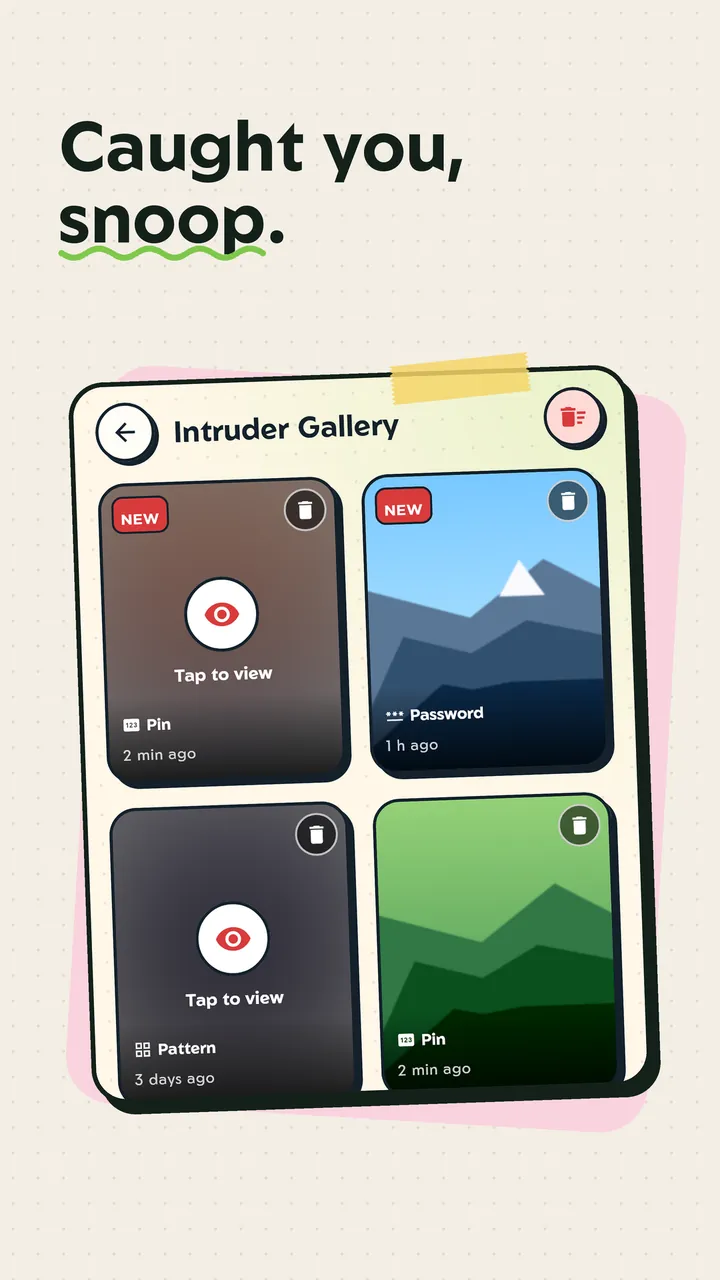
You left your phone on the table for ten minutes. When you came back, something felt off. Maybe the vault app was open on a different screen, or you just had a feeling. An intruder selfie is a small feature built for exactly that moment: when someone types the wrong code into your vault, the front camera quietly takes a photo, so later you can see who tried.
In KiWi Vault this is a Premium feature. Below we explain how it works, how to set it up, what it can realistically tell you, and the part people skip: the legal and ethical side of photographing another person, even on your own phone.
How an intruder selfie works
The idea is simple. Your vault is protected by a PIN, password or pattern. If someone enters it wrong, the app treats that as a possible snooping attempt and takes a picture with the front camera, which is usually pointing straight at whoever is holding the phone.
In KiWi Vault, here’s what happens on a wrong attempt:
- The front camera takes a photo without an on-screen prompt.
- The photo is saved inside your vault, not in your gallery.
- Each photo is stored with the time of the attempt and the method that was tried (PIN, password or pattern).
- Nothing is uploaded. There’s no account and no server of ours for it to go to.
- There’s no facial recognition. KiWi doesn’t analyse the face or build any kind of biometric template. It just stores the picture.
Only you can view these photos, because they sit behind the same lock as the rest of your vault, and you can delete them whenever you like.
One detail worth knowing: the trigger is a wrong PIN, password or pattern typed into KiWi. It doesn’t watch your phone’s main lock screen, and it isn’t a general security camera. It answers one question: did somebody try to get into my vault?
Setting it up in KiWi Vault (Premium)
Because it’s part of KiWi Vault Premium, you’ll need an active subscription or the lifetime purchase. Then:
- Open KiWi’s settings and find the intruder detection option.
- Allow camera access when Android asks. The feature can’t work without the CAMERA permission, and you can revoke it later in Android settings.
- Test it yourself. Lock the vault, enter a wrong code on purpose, then unlock it properly and check that a photo appeared with the right time and method.
- Check the lighting reality. Try a wrong attempt in a dim room. You’ll see quickly how much a front camera can capture in low light.
- Tell the people you live with. More on this below, but it’s the step we’d most like you not to skip.
If you also care about attempt limits and lockouts, KiWi Premium includes Brute Force Shield and lockout settings. Pair those with a code that’s hard to guess; our post on choosing a PIN, password or pattern covers what makes a code hard to guess but easy for you to remember.
What the photo can and can’t tell you
We’d love to say every snooper gets caught on camera. In practice, here’s what to expect.
It’s often useful for:
- Confirming that someone tried, which settles the “was it just my imagination” question.
- Seeing roughly when it happened, thanks to the timestamp.
- Spotting patterns, like repeated attempts at the same time of day.
It’s weaker when:
- The room is dark, or the person is holding the phone at an odd angle. You might get a ceiling, a chin or a blur.
- The person never types a code at all. Someone who just looks at your unlocked phone, or reads notifications, won’t trigger anything.
- The wrong code was yours. Fat-fingered your own PIN? Congratulations, you’ll have a lovely photo of yourself. That’s normal, and it’s a good reason to review and clear the photos now and then.
And a plain limit: this feature tells you that someone tried. It doesn’t stop a determined person from trying many times, it doesn’t protect a phone that already has spyware on it, and it won’t help if someone has your actual code. Treat the photo as a clue, not a verdict.
Using it lawfully and fairly
This is the section we take most seriously, because a camera that photographs people without them knowing is not a neutral tool.
The photo captures another person’s face. In many places, that image counts as personal data about them, even though KiWi doesn’t create any biometric identifier from it. Laws on photographing people, recording in the home or at work, notice and consent, and data protection differ a lot between countries and even states. For example, in the EU and UK the GDPR’s household exemption may not cover every situation, and some US states have biometric privacy laws (Illinois, Texas and Washington among them). We’re not lawyers and this isn’t legal advice. You’re responsible for using the feature lawfully where you live.
What we recommend, in plain terms:
- Use it only on your own phone. Never install KiWi on someone else’s device to photograph them, and never use it to monitor a partner, child, employee or housemate.
- Be open about it. Tell the people who share your home or use your phone that your vault takes a photo on wrong attempts. Honestly, that alone deters most snooping, which is the point.
- Keep it proportionate. Turn it on because you have a reason to protect your vault, not to build a file on someone.
- Don’t share the photos. Posting or forwarding someone’s picture to shame them can create real legal problems for you and real harm for them.
- Delete what you don’t need. Once you’ve seen what you needed to see, clear the photos.
- Think twice at work. Workplace recording rules are often stricter. If your phone is used in a work setting, check before switching it on.
If what you’ve found points to something serious, like someone controlling or threatening you, a photo in a vault isn’t the answer on its own. Talk to someone you trust or a local support service. Our post on the decoy vault also covers being pressured to open your phone.
Snooping prevention beyond the camera
An intruder photo works best as one piece of a few simple habits:
- Lock your phone itself, not just the vault. The vault is a second door; the phone lock is the first.
- Don’t let others watch you type. Shoulder-surfing beats any camera.
- Consider a disguise. KiWi’s free Calculator and Clock locks make the vault look like a utility, and Premium adds 8 secret icons. Fewer people try to open what they don’t notice.
- Set up recovery. KiWi has security questions and a recovery code, and no cloud backup. If you lose your code and recovery options, or lose the phone, the vault contents are gone, intruder photos included.
How this fits into KiWi Vault
We built our vault app to keep private photos, videos, notes and files on your own phone, offline, with no account. The intruder feature follows the same rule: the photos stay in your vault, under your lock, and never touch a server.
If it sounds useful, you can install KiWi from Google Play, try the free features first, and decide later whether Premium is worth it for you. The KiWi Vault page lists exactly what’s free and what’s Premium. And if you do switch the camera on, please tell the people around you. A vault that’s known to take a picture is the one nobody bothers to poke at.