What Is a Vault App, and Do You Actually Need One?
A vault app keeps private photos, videos, notes and files behind a lock on your phone. Here's how they work, what they can't do, and how to tell if you need one.
By the Nascentra team · 7 min read
A vault app is a locked space on your phone for the things you don’t want sitting in your gallery, your downloads folder or your notes. You put photos, videos, documents or private notes inside, and they only show up again when you enter your PIN, password, pattern or fingerprint. That’s the short answer.
The longer answer matters more, because “vault” is a big word and not every app earns it. We build one, so we’ve spent a lot of time thinking about what these apps really do, where they fall short, and who actually benefits. This post is the honest version: no fear-mongering, no promises we can’t keep.
What a vault app actually does
Most phones treat everything you save as fair game for every app that asks. Your gallery shows every photo. Your file manager lists every PDF. Anyone who picks up your unlocked phone, or borrows it to look at one picture, can scroll a long way.
A vault changes where a file lives. When you hide something, the app takes it out of the shared storage that your gallery and other apps read from, and keeps it in its own private area. On Android, each app gets a sandboxed storage space that other apps can’t browse. So once a photo is in the vault, it stops appearing in your gallery, your file manager and the photo picker in other apps.
Then there’s the lock on the front door. You open the vault with a code or biometrics, and depending on the app, you get extras such as:
- Disguises, where the vault looks like a calculator or clock on your home screen.
- Decoy vaults, a second code that opens an empty-looking vault.
- Intruder photos, where the front camera snaps whoever enters a wrong code.
- Notes and documents, not just pictures.
None of that is magic. It’s mostly about keeping private things out of casual view, which turns out to be what most people need.
Who really needs one (and who doesn’t)
Here’s the catch with privacy tools: the people who need them least often install the most, and the people who’d benefit most don’t think they’re “the type.”
You probably don’t need a vault if your phone is only ever in your hands, your lock screen is strong, and you have nothing you’d mind a family member seeing over your shoulder.
You probably do benefit from one if:
- You hand your phone to kids, partners, parents or friends to show them something.
- You keep scans of IDs, medical letters or financial documents on your phone.
- You have personal photos or videos you’d rather not have pop up in a slideshow or a “memories” feature.
- You share a device, or someone around you tends to “just have a quick look.”
- You’re a journalist, a carer or anyone who handles other people’s private information.
The common thread isn’t secrecy. It’s control over what shows up, and when.
The different kinds of vault apps
Not all vaults are built the same way, and the differences are bigger than the marketing suggests.
Built-in options
Many Android phones now include something vault-like, depending on the brand and Android version: a locked folder in the photos app, a secure folder from the manufacturer, or a private space for apps. They’re worth checking first, since they’re already on your phone. They tend to focus on photos or apps rather than notes and documents, and they usually don’t offer disguises or decoys.
Cloud lockers
Some services keep your private files on their servers, often tied to an account. The upside is backup: lose the phone, log in somewhere else, get your files back. The trade-off is that your most private files now live on someone else’s computer, under their terms. We wrote more about this choice in our piece on keeping an offline photo vault versus a cloud locker.
Offline, on-device vaults
These keep everything on your phone and nowhere else. That’s the approach we took with KiWi. No account, no servers, nothing uploaded. Nobody else holds a copy, which is the whole point, and also the biggest responsibility you take on (more on that below).
Disguised vaults
Some vaults hide their own existence by looking like another app. A calculator vault app is the classic example: it works as a calculator until you type your code. It’s a good fit when the problem isn’t just what’s inside the vault but the fact that a vault is on your phone at all.
What a vault app can’t protect you from
We’d rather you hear this from us than find out the hard way.
It won’t save you from a lost phone. If a vault keeps files only on your device, then a broken, stolen or reset phone takes those files with it. Same if you uninstall the app or clear its data. Keep a separate backup of anything you can’t afford to lose.
Forgetting your code can be final. With no account and no server, there’s no “reset password” email. Good vaults give you recovery options like security questions or a recovery code. Set them up on day one and keep them somewhere safe.
It doesn’t fix a compromised phone. If someone has already installed spyware on your device, or knows your phone’s unlock code and can watch you type your vault code, a vault is just another door they can walk through. Your phone’s own lock and updates still matter.
Disguises reduce attention, they don’t make things invisible. A calculator icon draws fewer eyes than an app called “Private.” It won’t fool someone who goes through your installed apps list in settings with a purpose.
Be wary of big promises. If a vault claims to be “unbreakable,” treat it as a warning sign. Honest apps tell you how files are stored and what the limits are.
How to choose one: a quick checklist
Before you install anything, run through these questions. They take two minutes and save a lot of regret.
- Where do my files go? On the phone, on a server, or both? Can I find this in the privacy policy in plain words?
- Does it need an account? If yes, who else can reach my files through that account?
- What happens if I forget my code? Is there a recovery option that doesn’t depend on me remembering the very thing I forgot?
- What does it actually hide? Photos only, or videos, notes, documents and other files too?
- Is it honest about security? Look for specific descriptions, not slogans.
- What’s free and what costs money? Know the limits before you move hundreds of files in.
- Does it show ads or carry trackers? An app holding your private photos shouldn’t be sharing data about how you use it.
If you’re mostly worried about your gallery, our step-by-step guide on how to hide photos on Android is a good next read.
Where KiWi Vault fits
We built KiWi Vault for the everyday version of this problem: you want certain things off your main screens, behind a lock you control, without handing them to a cloud service.
Here’s how it lines up against that checklist. Hidden items move into KiWi’s private app storage on your phone, protected by Android’s app sandbox and your device encryption. Your PIN, password and pattern are stored as hashes rather than in plain form, and security settings are encrypted. We’ll be straight with you: that doesn’t mean every single file is individually encrypted, and we don’t pretend otherwise. There’s no account, no cloud sync and no ads.
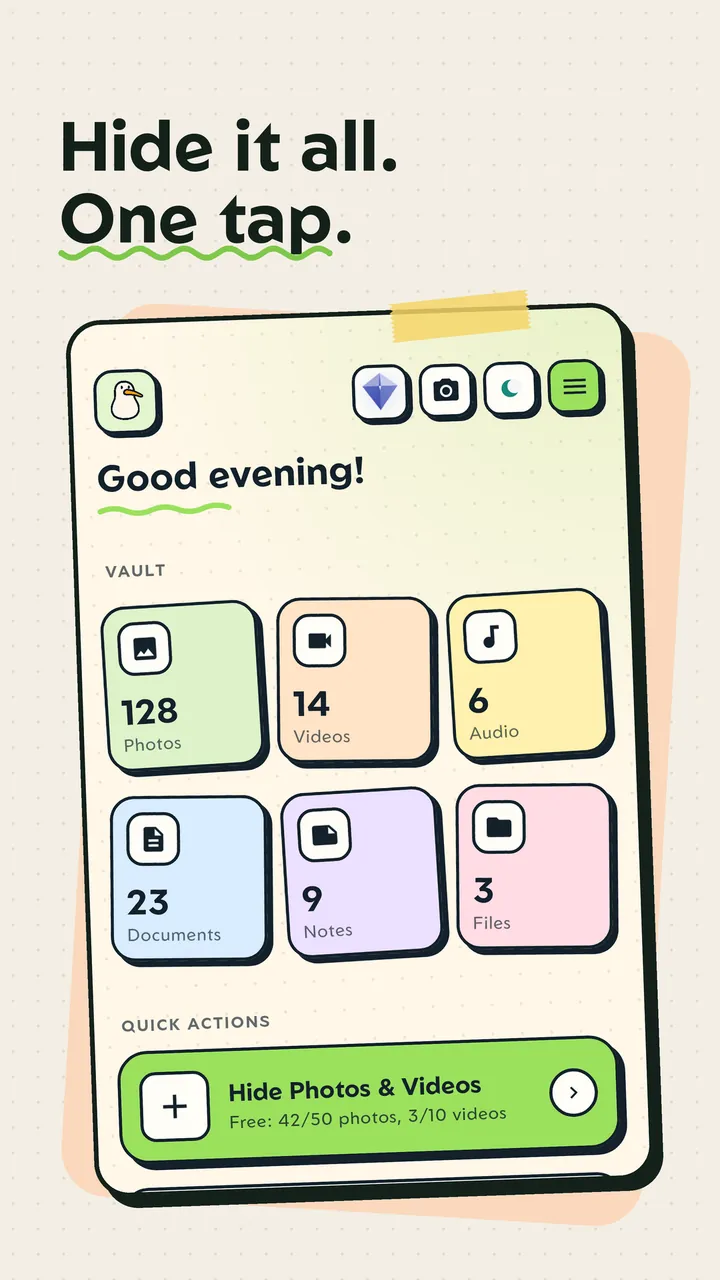
The free version lets you hide up to 275 photos and 50 videos, plus notes and files. It also includes PIN, password, pattern and biometric unlock, a decoy vault, Calculator and Clock disguises, and a Recently Deleted bin that keeps things for 30 days. Premium adds unlimited hiding and extras like Intruder Selfie and disguised app icons. You can see the full breakdown on the KiWi Vault page, or read how KiWi works under the hood.
And the honest bit again, because it matters: we have no copy of your vault. If you forget your code and your recovery options, or lose the phone, we can’t get anything back. Set up recovery when you first open the app.
If that trade-off sounds right for you, you can get KiWi Vault on Google Play. If it doesn’t, that’s a perfectly good answer too. The point of a vault is that you decide what’s private and where it lives.